
Learning how to write a content brief is the fastest way to cut revision cycles and get better drafts from freelance writers. Most content teams I’ve worked with lose at least two hours per article because their briefs leave writers guessing.
For the average user, give a writer a clear document with goals, keywords, and workflow details, and the draft will come back much closer to what you pictured. Industry data suggests that SEO brief extras like search intent, a primary keyword, 3-5 secondary keywords, SERP analysis, content gaps, and suggested H2s are common in 2026 templates. The bar keeps rising.
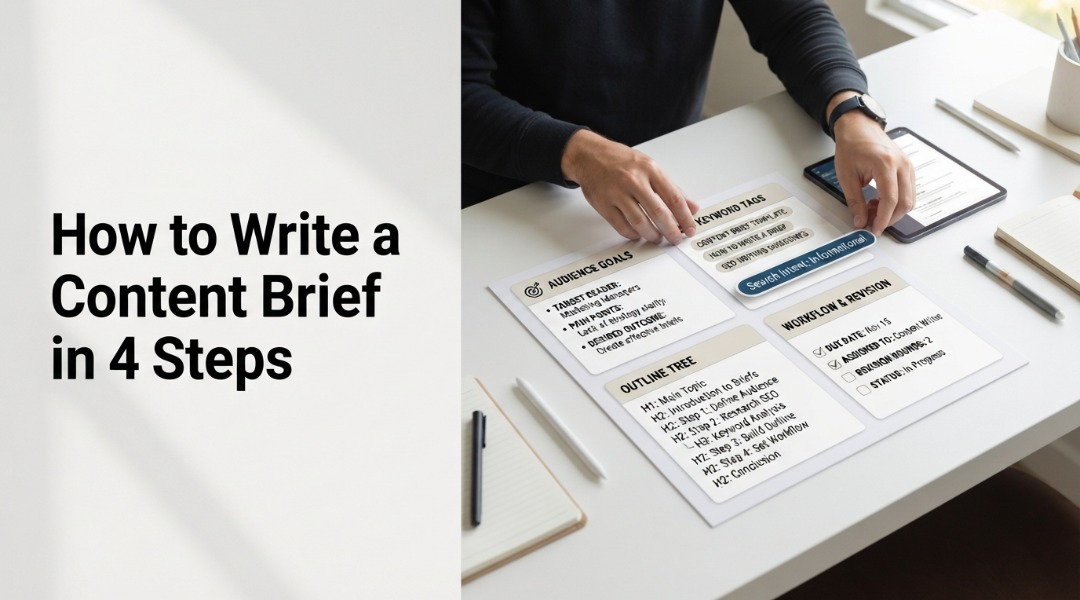
- A content brief is a short document that gives writers goals, audience, keywords, structure, and workflow details so they can draft without guessing.
- Include 3-5 secondary keywords, search intent, a rough H2 outline, and links to reference articles to match top-ranking content.
- Add workflow fields such as point person, communication channel, approval owner, and revision rounds to prevent handoff confusion.
Key Point
If you’re skimming, here’s what actually matters.
- One page, maybe two. That’s your hard limit.
- Always include search intent and 3-5 secondary keywords, since 2026 templates treat these as standard rather than optional extras.
- Skip audience context, and the writer may guess wrong, costing you a week in revisions.
- Link to 1-2 examples of the tone you want.
Table of Contents
- What is a Content Brief?
- What You’ll Need
- Step 1: Define Audience, Goals, and Business Context
- Step 2: Add SEO, Keywords, and Search Intent
- Step 3: Build the Outline and Link Guidance
- Step 4: Set Workflow, Review Rules, and Examples
- Common Mistakes to Avoid
- People Also Ask
- What to Do Next
What is a Content Brief?

A content brief is a short document, usually one to two pages, that gives a writer everything needed to produce a draft: ideal buyers, keywords, word count, outline, links, deadlines, and workflow details. The idea is to remove guesswork without overwhelming the writer.
HubSpot calls an awesome brief short and focused, with enough context to guide the writer without burying them. That matches what I’ve seen across content teams. The best briefs are both scannable and specific. You probably know someone who’s dealt with a vague brief that led to three revision rounds.
How does a content brief differ from a creative brief?
This loops right back to the first section. A content brief focuses on a single written piece and its SEO targets. A creative brief covers campaigns, visuals, and brand messaging. Keep them separate for standalone articles, though they can overlap when content supports a broader campaign.
What You’ll Need
To write a content brief, you need a keyword research tool, SERP analysis, a reusable template, and about 20 to 30 minutes per article. Basic SEO knowledge helps, but isn’t required if you have research data ready. Start with one keyword tool and one SERP method.
Your checklist:
- Keyword tool: Semrush, Ahrefs, or Google Keyword Planner for volume and difficulty scores.
- SERP analysis: Scan the top 5 ranking pages for your target keyword to identify the dominant format and content gaps.
- Template: A reusable Google Doc, Notion page, or Frase brief with fields for each section.
- Time: Budget 20-30 minutes for a standard brief; double that for pillar content.
Actually, you don’t need every tool on this list. Pick one keyword tool and one method for SERP analysis, and that’s enough to get started.
If you’ve already followed SEO content writing tips from our other guide, you’ve done the keyword research, and that saves you about 10 minutes per brief.
Step #1: Define Audience, Goals, and Business Context
Start with 2-3 sentences explaining who the reader is, what action they should take after reading, and why the article matters to your business. This section prevents the most common brief failure: writers who don’t know every audience make assumptions and almost always get them wrong.
Open your template and fill in every audience field. Be particular. “Marketing managers at B2B SaaS companies with 50-200 employees” beats “business professionals” every single time.
I’ve seen briefs that simply say “general audience,” and the results are consistently a mess.
Next, state the goal in one sentence. What should the reader do? Sign up for a newsletter? Ask for a demo? Understand a concept before reading a deeper guide?
Then add business context: mention the campaign this article supports, the product it ties to, or the funnel stage it serves. Freelance writers on Reddit consistently say that knowing that business context helps them match the tone and depth without overshooting.
What happens when you skip audience context?
Writers fill the gap with assumptions. They choose a tone, a depth level, and examples based on what seems reasonable. About 8 times out of 10, those assumptions don’t match what you wanted, and you spend the first revision fixing fundamentals.
Step #2: Add SEO, Keywords, and Search Intent
Add your primary keyword, 3-5 secondary keywords, search intent, and a word count range based on SERP analysis. Industry data indicates that search intent, the primary keyword, 3-5 secondary keywords, SERP analysis, content gaps, and suggested H2s are common in 2026 templates. These fields are now standard rather than optional.
Under normal conditions, start with the primary keyword. Put it at the top of the brief so the writer sees it first. Then list 3-5 secondary keywords; these related terms help the writer cover the topic without repeating the same phrase.
Search intent matters more than keyword count. Is the reader looking to learn, compare, or buy? Stating the intent (such as informational or commercial) tells the writer how to frame the piece.
Set a word count range based on the top 5 ranking pages. If they average 1,800 words, your range might be 1,500-2,000. Don’t pick a number from thin air.
I made that mistake early on and got drafts that were too thin or bloated. To be clear, the range should always come from SERP data, not a gut feeling.
If you need help with how to use keywords in content writing, that guide breaks down placement strategies in detail.
Content Brief Fields by Category (Number of Fields)
How rigid should keyword targets be?
Not wildly; give the writer the primary keyword and 3-5 secondary keywords, then let them work those in naturally. The draft will feel formulaic and be less useful to readers if you demand exact-match placement in every paragraph. Industry consensus suggests that overly rigid targets produce stilted content that ranks but doesn’t convert.
Step #3: Build the Outline and Link Guidance
Create a rough H2 outline based on your SERP analysis, and list 3-5 internal links plus 2-3 external sources for the writer to reference. The outline doesn’t need full sentences; H2 headings with a one-line note for each section give the writer enough structure without boxing them in.
Pull your H2s from subtopics that appear across the top 5 ranking pages. If 4 out of 5 competitors cover “pricing comparison,” include it. If only 1 mentions “industry history,” skip it.
Note content gaps, too. What are competitors missing? Maybe none of them address a common objection or a recent change. Point these out so the writer knows where to differentiate.
For internal links, list the specific URLs and suggest anchor text. Don’t just say “link to our SEO guide.” Give the exact URL and a natural anchor phrase. That’s where structuring content for Google AI Overviews becomes relevant: clear H2 outlines help search engines parse your content.
In most scenarios, external sources should be high-authority sites that support claims; link to a Semrush study, a HubSpot report, or an industry survey.
Step #4: Set Workflow, Review Rules, and Examples
Add workflow details like the point person, communication channel, approval owner, and number of revision rounds. Multiple 2026 guides stress that adding review workflow details like these reduces confusion for freelance writers. Also include 1-2 examples of articles that match your desired tone and depth.
Name each point person. Who answers the writer’s questions? Give their name, email, and preferred channel. Slack works for quick questions; email works for formal feedback.
Set the deadline, and include not only the draft due date but also the revision turnaround. Writers need to know whether they’ll have 2 days or 5 days to make changes.
Specify revision rounds. Two rounds are standard. If you expect three or more, say so in the brief so the writer can price accordingly.
Include comparable examples because they make it easier for writers to match tone and depth. Link to 1-2 articles you like, and note what works about them.
Why do freelance writers care about revision rounds?
Revision rounds affect their income. A writer who budgets for two rounds but gets four has taken a pay cut. Stating revision expectations upfront builds trust.
In reality, most freelancers on Reddit say clear workflow details are what make them want to work with a client again.
Common Mistakes to Avoid
The five most common content brief mistakes are skipping audience context, making briefs too long, setting overly rigid keyword targets, omitting workflow details, and forgetting to include examples. Each one adds revision cycles and frustrates freelance writers who have to guess what you meant.No audience context.
- Writers guess, and they guess wrong. Fix this by writing 2-3 specific sentences about your reader before anything else.
- The brief is 5 pages. That’s too long. Freelancers need to scan quickly, so cut anything that isn’t directly practical.
- Rigid keyword rules: Demanding exact placement 7 times produces robotic content. Give the keywords and let the writer handle placement.
- Missing workflow details: Who approves the work? How many revisions are allowed? Which channel should the writer use? Answer these three questions in the brief.
No examples. Writers can’t match a tone they’ve rarely seen, so link to 1-2 articles and note what you like.
People Also Ask
A content brief should be one to two pages, or roughly 300-600 words, and aim for scannability, not thoroughness. If the writer needs 10 minutes just to read the brief, it’s too long.
Include one primary keyword and 3-5 secondary keywords, and add search intent and note the monthly search volume and difficulty score if available. These fields are standard in 2026 SEO brief templates.
The content manager or SEO strategist usually writes the brief. The editor may review it before it reaches the writer. In solo operations, you write it yourself before handing it to a freelancer.
Yes. If your brief includes full paragraphs under each H2, you’re writing the article yourself. Keep notes to one line per section and trust the writer to fill in the rest.
What to Do Next
Now that you know how to write a content brief, create a reusable template with all the fields covered in this guide. Test it on your next 3 articles, track revision rounds, and adjust based on writer feedback. The first brief takes longer; after that, each one takes about 20 minutes.
A solid brief saves time on every article. The first one takes longer mainly since you’re building the template. After that, each brief takes 20 minutes and saves at least an hour in revisions. For more on writing better content for your website, that guide covers what happens after the draft comes in.
- Build your template, Create a Google Doc or Notion page with all fields from Steps 1-4 above.
- Run a SERP analysis, Pull the top 5 ranking pages for your next article’s target keyword.
- Draft your first brief, Fill in every field in 20-30 minutes using the process above.
- Send it to a writer, Ask for feedback on clarity and completeness after the first draft.
- Track revision rounds, Compare your next 3 articles against your pre-brief average to measure improvement.